Choose a starting point. We review your rules or existing code before confirming the final price and delivery date.
01 / CUSTOM INDICATORS
Your indicator. On the Tradovate chart.
Fixed quoteafter we review your rules
Levels, signals and markers in Tradovate's own JavaScript indicator format, imported through the Code Editor.
Port from MT4, NinjaTrader or Pine Script, or build new
Match the original on the same bars
Install steps for the browser app
Indicators display and alert; they do not place orders.
02 / ALERT AUTOMATION
TradingView alert. Tradovate order.
Fixed quoteafter we review your rules
Your strategy runs in Pine Script; its alerts go through the alert bridge you choose to your Tradovate account.
Write the entry, exit and risk rules
Build the Pine Script strategy and alert messages
Test end to end in Tradovate Simulation
You choose and pay for the bridge service; we set it up with you.
03 / API AUTOMATION
A rules-based bot on the Tradovate API.
Fixed quoteafter we review your rules
A program on your VPS that places, manages and closes orders through the Tradovate API, with hard risk limits in code.
Daily loss, max position and session limits first
Order handling and reconnects tested in Simulation
Logs for every order decision
API access is set up on your own Tradovate account. No return or profit promises.
Every agreed build
Numbered spec · Defined deliverables · One review round · Setup notes · 30-day warranty: if the code breaks a rule in the signed spec, we fix it free. All code written for you is yours, with full source. New requirements are scoped separately.
HOW WE CHECK IT
Tested rule by rule. Shown on video.
You see each rule working in Tradovate Simulation before final payment.
A / SPEC
Every rule numbered.
Your notes become a numbered list of rules, inputs and limits.
Nothing is built until you approve it
Edge cases written down, not guessed
Rough notes, screenshots and examples are fine.
B / SIMULATION
Simulation first.
Everything is tested on Tradovate Simulation, never on a live account.
Orders and limits checked step by step
Restarts and reconnects included for bots
You decide when to run it live on your own account.
C / ACCEPTANCE VIDEO
Shown, not described.
A short screen recording walks through each numbered rule.
Indicators compared with the original
Risk limits shown firing
You review it before final payment.
CLIENT PROJECT · SHARED ANONYMISED
Two MT4 indicators, rebuilt for Tradovate.
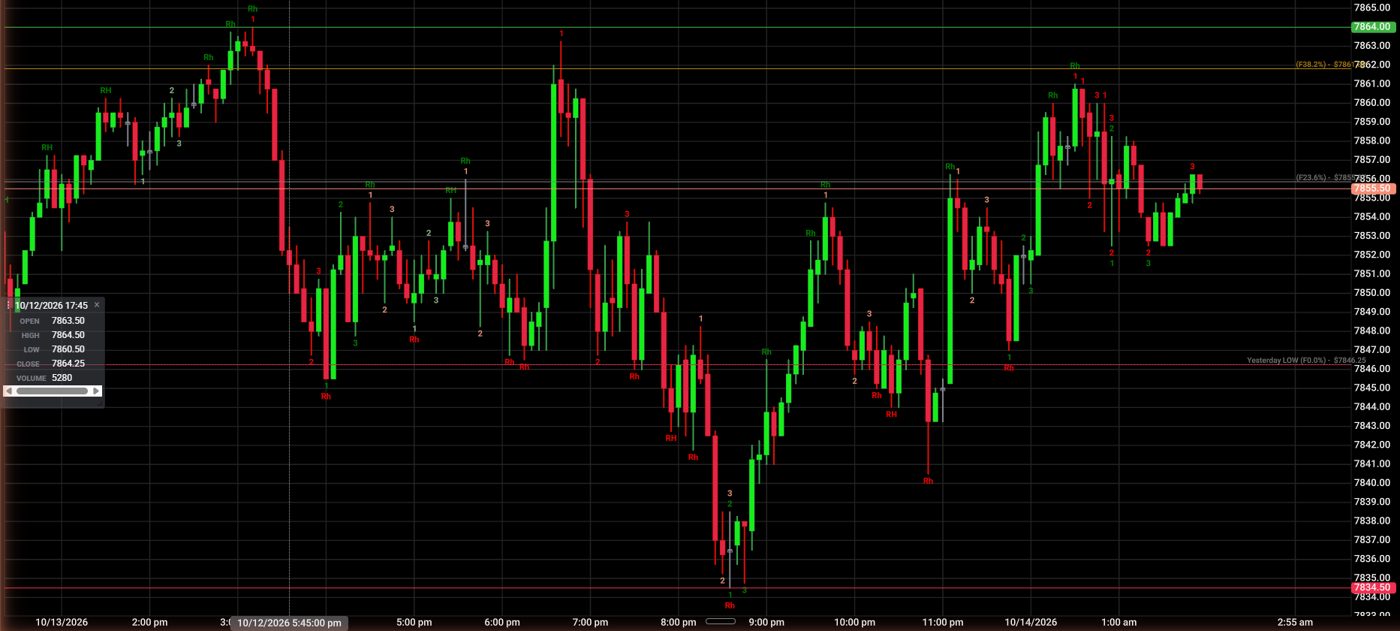
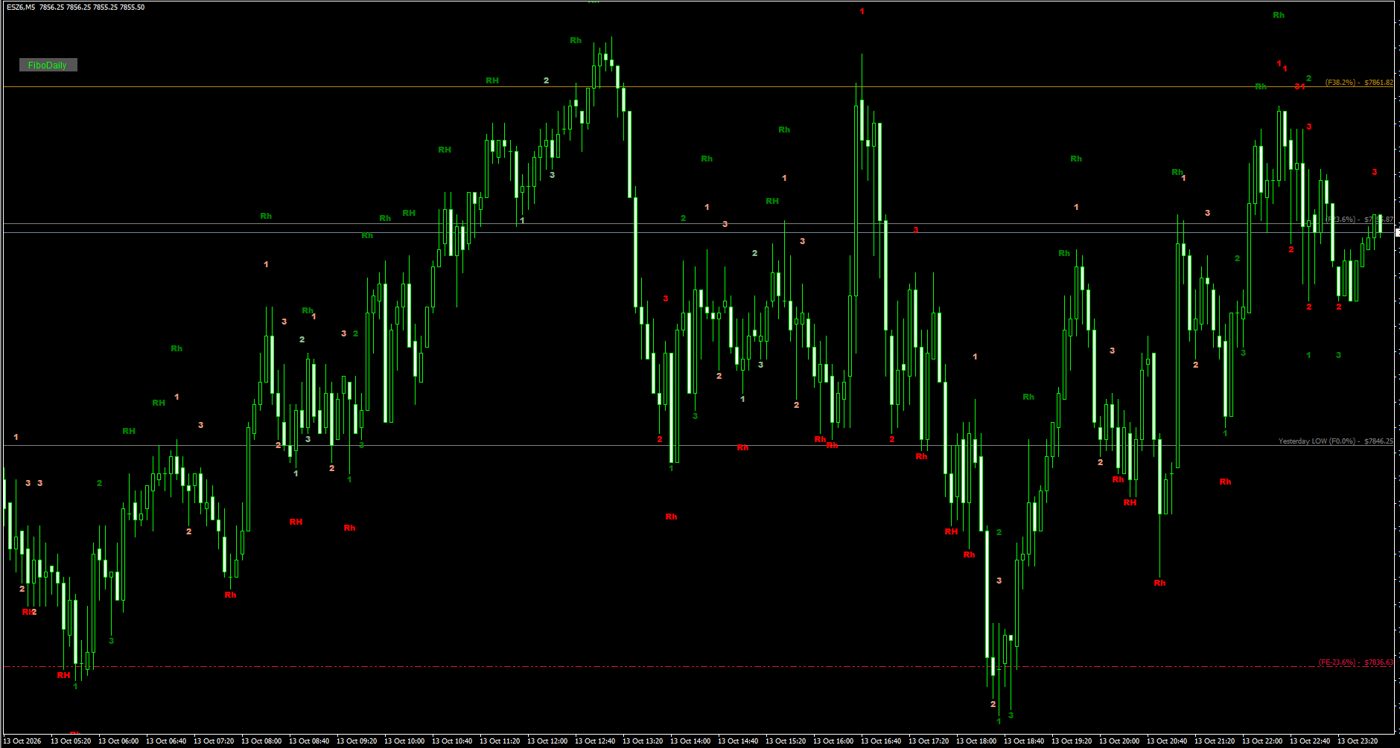
A futures trader wanted his MT4 indicators (1-2-3 highs and lows with Ross hooks and Bollinger breaks, and daily Fibonacci levels) in the Tradovate browser app. We rebuilt both as Tradovate JavaScript indicators and ran the original MT4 versions on exactly the same bars: ES, MNQ, MGC and M2K on 5 and 15 minutes, every marker compared by time, type, text and colour. Result: 0 differences on all 8 charts.
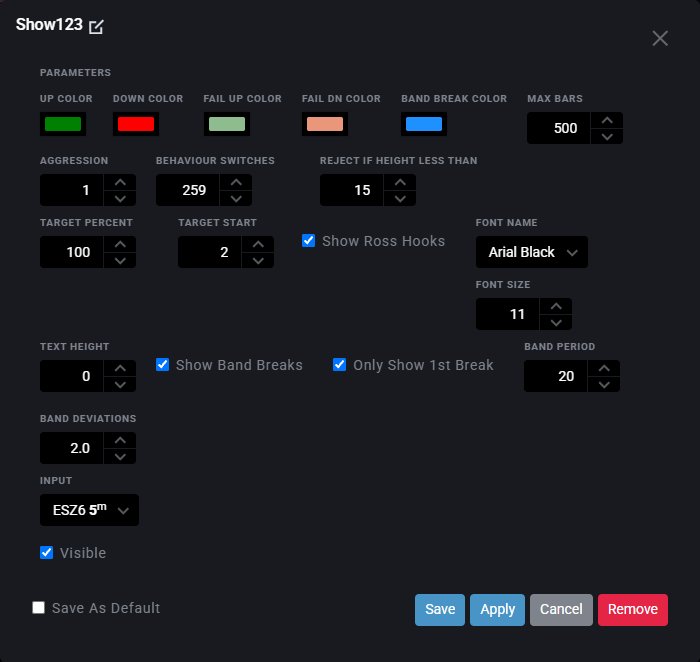
Tradovate (Simulation): the ported indicators on ES, 5 minutes.MT4: the original indicators on the same bars, for the side-by-side check.All original inputs kept, in Tradovate's own settings dialog.
Shown with the client's details removed. Results describe indicator behaviour only, not trading results.
OUR APPROACH
A clear brief. A better build.
Know what will be built, how it will be reviewed and what you will receive before development starts.
01
Tell us what you need
Share your platform, rules and examples. Have an existing tool? Tell us what needs to change.
02
Agree the scope
Confirm the features, deliverables, test cases, price and timeline before work begins.
03
Build, review, hand over
Review the software against your brief. Receive the agreed files, setup guidance and support terms.
BEFORE YOU SEND A BRIEF
A few clear answers.
Can a Tradovate indicator place trades?+
No. Tradovate custom indicators draw and alert only. Automated orders need either an alert bridge (for example from TradingView) or a program on the Tradovate API.
Can you convert my MT4 or NinjaTrader indicator to Tradovate?+
Yes. We rebuild it as a Tradovate JavaScript indicator and compare it with the original on the same bars before delivery.
Do you test on my live account?+
No. We test in Tradovate Simulation. You decide when to use it live on your own account.
How is the price set?+
Every project gets one fixed price after a scope review. You get a written quote, delivery date and support terms before any work starts.
Will the bot make money?+
No one honest can promise that. We prove the code follows your rules and limits exactly. Whether the rules are profitable is your trading decision.
Describe the problem or feature. We reply within 24 hours, Monday to Saturday, with questions, a numbered spec and a fixed quote. You can attach screenshots or source files in live chat after sending.
Send a short summary and continue the conversation in this browser.